The Light-O-Rama S5 Sequencer's Tools Menu gives you access to a set of functions that are unrelated to a specific sequence.
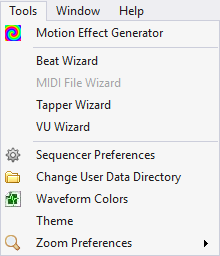
The Tools Menu
Motion Effect Generator
This option on the Tools menu opens the Motion Effect Generator window.
•When no sequences are open, this menu item can be used to create motion effects and optionally save the one’s you like as favorites. In the Motion Effect Generator, you can freely switch the preview and prop down-down selections to see how your effect looks on any display element. You can do this at any license level.
•When a sequence is open, this menu item can be used to place a motion effect into the current grid selection See the Sequencing topic for more information on how to use the Motion Effect Generator when editing your sequences. Placing motion effects in a sequence requires the Pro license level.
Beat Wizard
This option on the Tools menu opens the beat-detecting audio wizard.
MIDI File Wizard
This option on the Tools menu opens the MIDI file audio wizard. This option will only be enabled if the sequence's media file is a MIDI file (.MID file extension).
Tapper Wizard
This option on the Tools menu opens the Tapper audio wizard.
VU Wizard
This option on the Tools menu opens the VU audio wizard.
Sequencer Preferences
This option on the Tools menu opens the Sequencer Preferences dialog, which allows you to customize some of the look and behavior of the S5 Sequencer..
Change User Data Directory
This option on the Tools menu allows you to change the default directory where your audio and sequence files are stored. You should back up your sequence files before initiating this action.
Waveform Colors
This option on the Tools menu allows you to customize the colors of the waveform display.
Theme
This option on the Tools menu allows you to choose among several themes (color schemes) for displaying the main window of the Light-O-Rama Sequencer
Zoom Preferences
This option on the Tools menu allows you to customize zoom preferences (default row height and time scale width) for new sequences.