The Light-O-Rama Sequencer's MIDI File Wizard can be used to automatically populate beat channels based on a the notes in the MIDI file.
The MIDI File Wizard is available (for musical sequences based on MIDI files) as an option when creating a new musical sequence, or can be accessed later via any of the methods listed in the Audio Wizards topic.
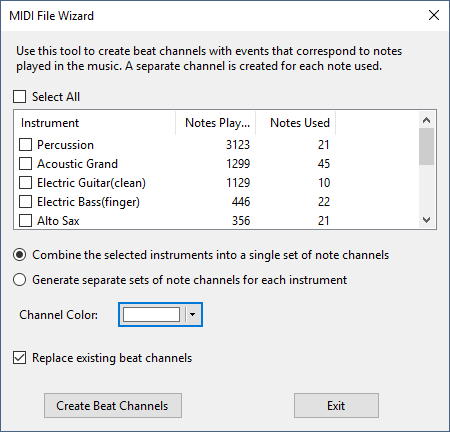
The MIDI Wizard window
Select Which Instruments to Include
The window lists all of the instruments used in the song. For each instrument it lists:
•how many total notes are played by the instrument
•the number of distinct notes played by the instrument
Check the boxes next to the names of the instruments you wish to include.
Combine Instruments?
Click the radio button that indicates how you want the beat channels created:
•One channel for each note -- combining the notes for all selected instruments
•One channel for each note and instrument (this can produce a lot of beat channels)
Channel Color
Choose the color that the new beat channels will use when displayed on the sequence grid.
Replace Existing Beat Channels?
The MIDI wizard can create a lot of beat channels. By checking this box, you can have the existing beat channels deleted and replaced with the new set you are creating. Leave the box unchecked if you want to keep the existing beat channels -- the new ones will be appended to the list.
Finish
Click the "Create Beat Channels" button to create the new beat channels and close the window.