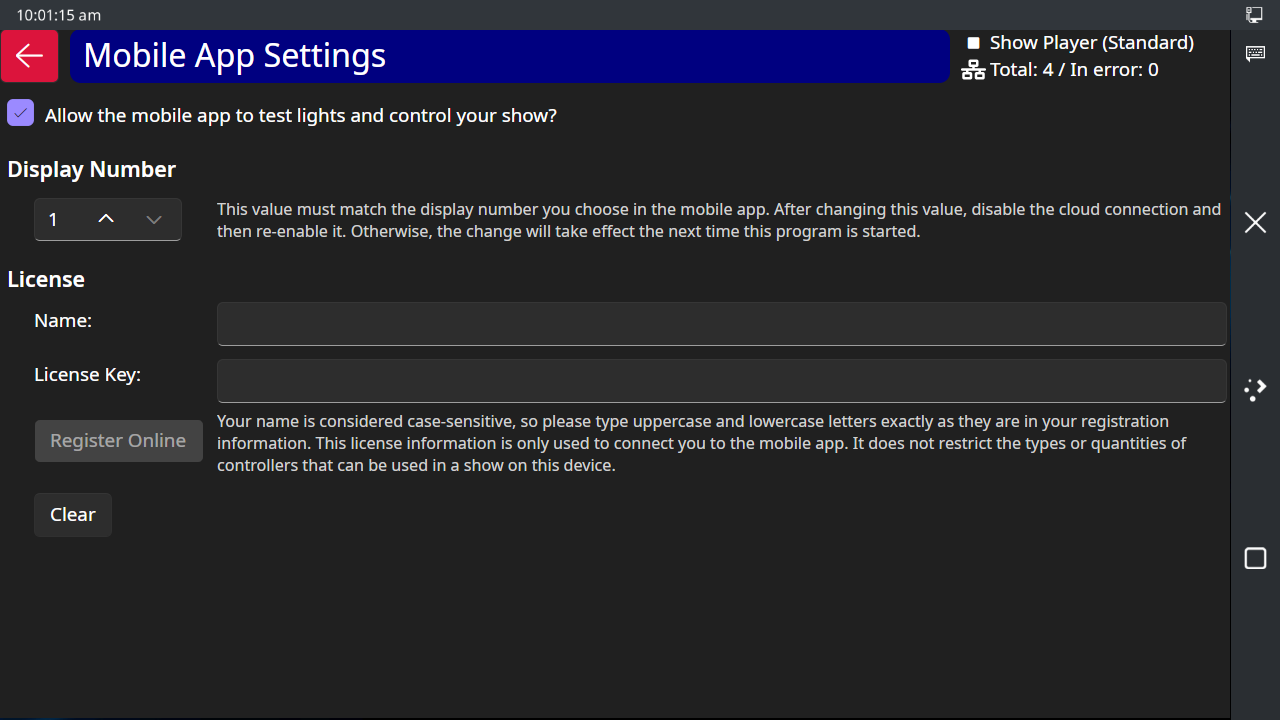
The Mobile App screen
The Touch Player has a companion mobile app so that you can control your lights without being in front of your device. This connection is made through the "cloud" so that you can connect to your Touch Player from anywhere on the planet! However, in order for it to work, your Touch Player must have an active Internet connection, and your phone running the Light-O-Rama mobile app must also have an active Internet/data connection.
Using this feature is optional, but is provided by Light-O-Rama at no extra cost - it is included with your license.
Cloud Status Icon and Button
The icon on the Mobile App button changes based on the connection status:
Icon |
Name |
Meaning |
|
DISABLED
|
Connection is disabled by the user. In other words, you don't want to allow a remote connection to your Touch Player. |
|
DISCONNECTED |
The Touch Player was unable to connect to the cloud. Either your device is not connected to the Internet or there is a problem with the cloud service. |
|
UNPAIRED |
The Touch Player is connected to the cloud, but the phone app is not connected. |
|
PAIRED |
The Touch Player is connected and the phone app is connected. |


The Mobile App Screen
Tapping the Mobile App button takes you to a screen where you can:
•Enable or disable the cloud connection
•Set the "Display Number". If you are using the same Light-O-Rama license to run multiple displays (e.g. one at your house and one at your parent's house), you must set a unique display number to each display. Display numbers can range from 1 to 10.
•Enter your license key. A Light-O-Rama license key is required to use the mobile app. The level of the license (Basic, Advanced, or Pro) does not matter, it will not restrict the number of lights you can control with your Touch Player. However, the license key you enter here must match the license key you enter in the mobile app.
If you are running the Light-O-Rama Control Panel on a computer and also using the Touch Player, you should assign a different Display Number to each one.