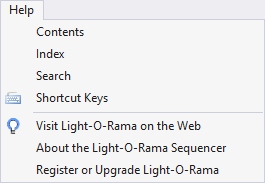
The Help menu of the Light-O-Rama Sequencer brings up help and other information about Light-O-Rama.
The following options are available on the Help menu:
•Visit Light-O-Rama on the Web
•About the Light-O-Rama Editor
•Register or Upgrade Light-O-Rama
Contents
This option on the Help menu opens up the main Sequencer topic in the Light-O-Rama help file.
It has a keyboard hotkey: F1
Index
This option on the Help menu opens up the index of the Light-O-Rama help file.
Search
This option on the Help menu opens up the search menu of the Light-O-Rama help file.
Shortcut Keys
This option on the Help menu opens up the Keyboard Shortcut Summary in the Light-O-Rama help file.
Visit Light-O-Rama on the Web
This option on the Help menu opens the Light-O-Rama website in your web browser.
About the Light-O-Rama Editor
This option on the Help menu brings up the Sequencer's About box, which displays some information about the program and your computer.
Register or Upgrade Light-O-Rama
Use this item on the Help menu to register your Light-O-Rama software, or to upgrade to a higher level license, unlocking various features.