This Light-O-Rama Visualizer wizard allows you to create light trees (mega trees) with either strings or CCRs. Depending on your selections, some options may not be available.
| • | Size |
| • | OK |
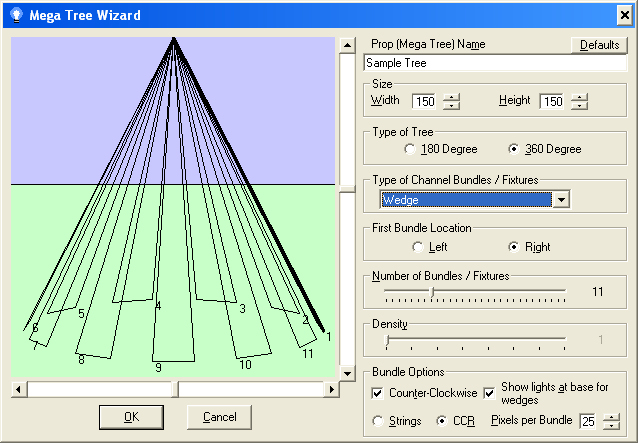
The Visualizer's Tree Wizard
Shows what the tree will look like with the parameters you have specified.
The name the prop will be given when the tree is created in the editor. Any fixtures created will use this name plus a sequence number (e.g. "Example Tree 1" for the prop name "Example Tree").
The size of the tree in pixels, in both width and height. The width of the tree is the round base, while the height is the size of the center pole. You can always make the prop larger or smaller by using the tool handles in the editor after creation.
The wizard can create full trees (360 degrees) or half trees (180 degrees).
Type of Channel Bundles/Fixtures
When the wizard creates the tree, each channel bundle (also called a segment) can be created in several different ways:
| • | Wedge: The bundle is created by starting on the base, going to the top of the virtual center pole, and then back down to the base. |
| • | Edge to Center: The bundle is created starting at the base and running to the top of the virtual center pole. |
| • | Center to Edge: The bundle is created starting at the top of the virtual center pole and running to the base. |
| • | Up and Over: The bundle is created starting at the base, running to the top of the virtual center pole, and then back down again directly opposite of where it started. |
Allows you to control where the first bundle is created. You can further refine the starting location by using the horizontal scroll bar to "spin" the tree through the virtual center pole.
This slider allows you to choose how many independently controllable regions will be created. For light strings, each bundle will become a fixture.
You can make the tree appear to be more full by increasing the density.
These options allow further control on how the bundles/fixtures will be created:
| • | Counter Clockwise: When creating bundles, the system will normally create them from the location you specify, continuing around clockwise from that point. If you select this option, the bundles are created from your starting point, but in a counterclockwise motion instead. |
| • | Show lights at base for wedges: If you are creating wedge-shaped channel bundles, enabling this option shows the lights at the base connecting the legs of the wedge. |
| • | Strings/CCR: You can elect to create the tree as a CCR tree, or using light strings. |
| • | Pixels per Bundle: If you are creating a CCR-based tree, this field allows you to set the number of pixels each bundle will use. |
The scroll bars allow you to change the perspective of the tree to better match your stage. The vertical scroll bar allows a 180 degree view, from inside the tree looking straight up at the top of the center pole, to straight on, to above the tree looking straight down at the center pole. The horizontal scroll bar allows you to rotate the tree around the center pole This allows you to refine the starting place of the first bundle.
Create the tree.
Close the dialog with no change.
Resets the parameters to logical defaults if desired.