This Light-O-Rama Visualizer dialog allows you to create a matrix of CCR pixels, much like a jumbotron. You first select the tool from the editor and then draw a rectangular area. When the area is drawn, this dialog appears, allowing you to set the parameters.
| • | OK |
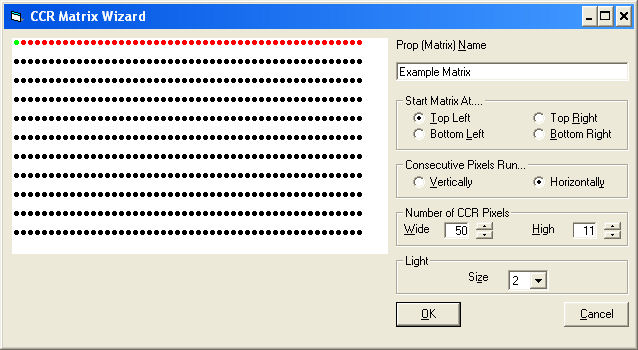
The Visualizer's CCR Matrix Wizard
Shows what the matrix will look like with the parameters you've specified. The colors shown here are to help you with the orientation of the matrix:
| • | Green Pixel: The very first pixel that will be created (starting pixel). |
| • | Red Pixels: The pixels that comprise the first row (horizontally) or the first column (vertically). |
| • | Black Pixels: All remaining pixels. |
The name the prop will be given when the matrix is created in the editor. Any new fixtures created will use this name plus a sequential number (e.g. "Example Matrix - CCR 1").
Determines where the first pixel of this matrix will be created (top left, top right, bottom left, or bottom right).
Determines how the pixels run from the first pixel (either vertically or horizontally).
How wide and high the CCR matrix will be, in pixels.
The physical size of the CCR pixels as rendered in the Visualizer.
Create the matrix with the supplied parameters.
Discard changes.