If your computer is connected to the internet, you can register Light-O-Rama directly in the License section. If not, you can still register while offline. Open the License section and click the "Register Offline" button.
Doing so will display the Offline Registration screen:
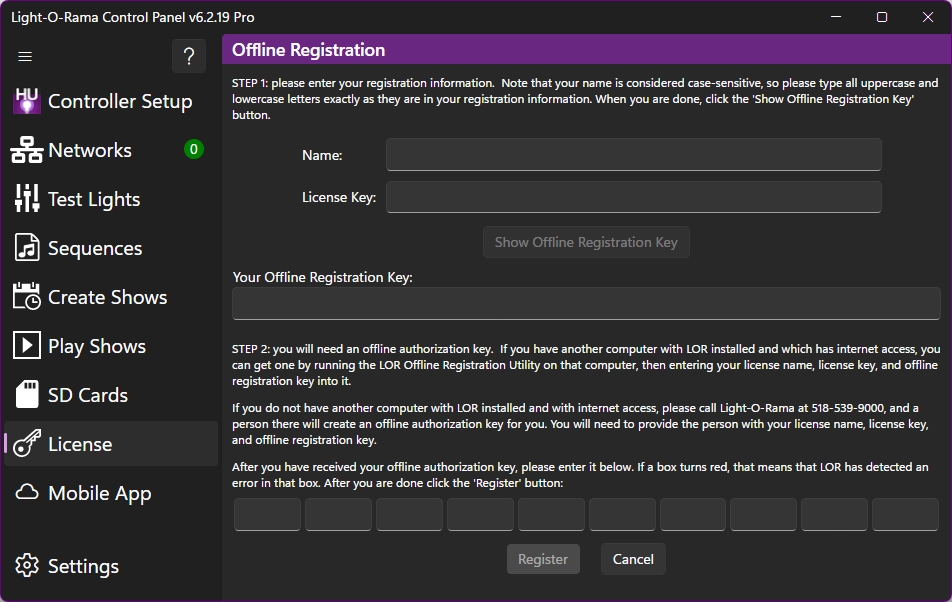
The Offline Registration Screen
Once this dialog is opened, follow the instructions on it to register offline. A brief summary:
First, enter your license name and license key (these can be copied and pasted from the email in which they are sent to you).
Next,click "Show Offline Registration Key".
At this point, you will need to use your offline registration key to get an offline authorization key. There are two ways to do this:
First, if you have another computer, which is connected to the internet and which has Light-O-Rama installed, you can run the Offline Registration Utility on that computer. Make sure to have your license name, license key, and offline registration key available to enter onto that computer; the Offline Registration Utility will use them to create an offline authorization key.
If you do not have another computer that you can use to run the Offline Registration Utility, then you can obtain an offline authorization key by calling Light-O-Rama at the telephone number shown on their web site. Provide the person you speak to with your license name, license key, and offline registration key, and they will provide an offline authorization key to you.
After you have obtained an offline authorization key, type it into the boxes near the bottom of the form, and click "Register".
After you have successfully registered, you may need to close any Light-O-Rama programs that are running and restart them before all of your newly available features can be used.