|
Light-O-Rama software running on a computer can control a wide variety of hardware devices and communicate with them via several different methods. In the simplest case, the devices are connected to your computer via a USB to RS485 adapter sold by Light-O-Rama. Light-O-Rama also supports communication to: •DMX devices via USB to DMX adapters, •Ethernet-connected devices via the E1.31/sACN protocol. |

Typically, Light-O-Rama controllers are connected to USB adapters, and up to 16 USB adapters can be connected to a single computer - that is, 16 different "networks". In many cases, a Light-O-Rama user will only need a single network -- that is, a single USB to RS485 adapter -- for all of his or her controllers: this is called the "Regular" network. Should additional networks be needed, 15 auxiliary networks ("Aux A", "Aux B", and so on, up to "Aux O") are also available, each of which would be controlled via a separate USB adapter.
The Network Preferences window can be resized if needed to show more networks.
Click the links below to find more information about each function:
•use the LOR tab to configure networks connected to Light-O-Rama USB to RS485 adapters (or the old Light-O-Rama serial port adapter).
•use the DMX tab to configure DMX universes associated with USB to DMX adapters or E1.31/sACN controllers. An Advanced or Pro license is required to control DMX universes.
•use the Misc tab if you have old Light-O-Rama MC-P controllers (pre-2004) or the Light-O-Rama Comm Listener is interfering with other software on your computer.
•use the Export/Import buttons to save your current preferences or restore an old configuration.
•click the "Find/Configure PixCon16" button to configure Light-O-Rama PixCon16 controllers. After configuring the controller, you will need to make sure the universes you just assigned in controller configuration are also configured on the DMX tab.
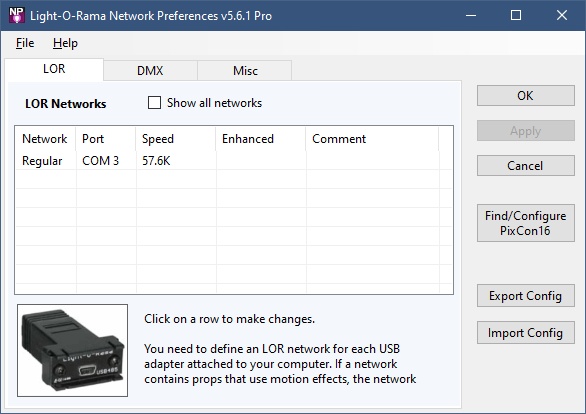
The Light-O-Rama Network Preferences program