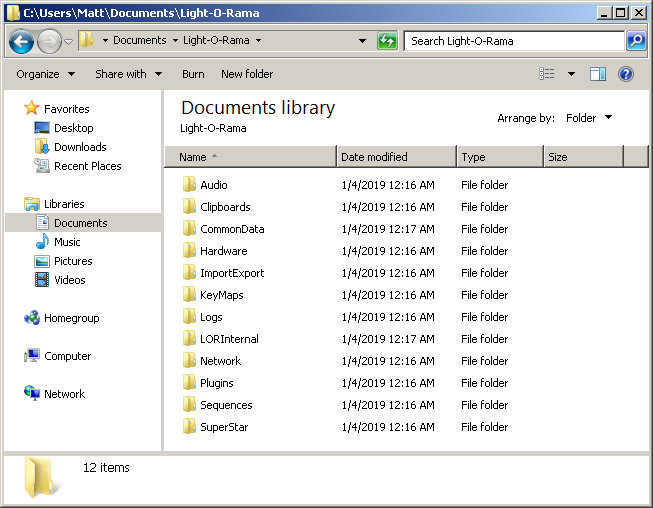
The first time you start the Light-O-Rama software, you will be prompted for the name of the folder where you want to store sequences and other related files. The default choice is to create a "Light-O-Rama" sub-folder below your "Documents" folder, as shown below.

Light-O-Rama Sub-folders
Regardless of where you choose to put the Light-O-Rama data folder, it will contain the following sub-folders:
Audio
The "\Light-O-Rama\Audio" folder is where you should store the media files (audio and/or video) that you will use as the music track for your sequences. The advantage of storing them here, is that Light-O-Rama programs will look for the media files here by default. If you move your sequences to a different computer, or share your sequences with another user, as long as you store the media file here, Light-O-Rama programs will always be able to find the media file without prompting.
Clipboards
The "\Light-O-Rama\Clipboards" folder is where clipboards for the Sequencer are stored when cutting, copying, or pasting effects. Clipboard files have a ".LCB" file extension. Clipboard files created by third-party programs should be placed in this folder.
CommonData
The "\Light-O-Rama\CommonData" folder contains a number of important files:
•Previews (LORPreviews.xml)
•Motion Effect Favorites (LORFavorites.xml)
•Color Fade tool favorites (LORGradients.xml)
•Motion Effect Generator palettes (LORPalettes.xml)
Hardware
The "\Light-O-Rama\Hardware" folder stores dimming curves that can be loaded into a controller.
ImportExport
The "\Light-O-Rama\ImportExport" folder is the default location for files exported from the Sequencer, including previews, props, and motion effect favorites.
KeyMaps
The "\Light-O-Rama\KeyMaps" folder is not currently used in S5.
Logs
The "\Light-O-Rama\Logs" folder is not currently used in S5.
LORInternal
The "\Light-O-Rama\LORInternal" folder is used as temporary storage by some Light-O-Rama programs. You should not make any changes to the items stored in this folder or any of its sub-folders.
Network
Below "\Light-O-Rama\Network" folder is a sub-folder called "SavedConfigurations", where exports from Network Preferences are saved. These files have a ".LIV" extension.
Plugins
The "\Light-O-Rama\Plugins" folder contains sub-folders where files can be added to extend the functionality of the Sequencer:
•prop shapes (not yet supported)
•motion effects (not yet supported)
•software dimming curves
Sequences
The "\Light-O-Rama\Sequences" folder is where your sequence files should be stored. S5 Sequence files have a ".LOREDIT" extension.
SuperStar
The "\Light-O-Rama\SuperStar" folder contains files used by the SuperStar Sequencer.
Moving Files To A New Computer
If you move your Light-O-Rama software to a new computer, you should copy files in all of the sub-folders noted above, with the exception of Logs and LORInternal.