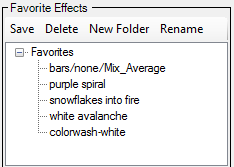
In the Pixel Editor's Effect Generator, if you create an effect and want to save it for later use, you can save it to the Favorite Effects area (bottom center). Click a folder in the favorites tree where the effect should be saved (the first time click on “Favorites”), then click Save. Your tree of favorite effects can be organized by using the Delete, New Folder, and Rename buttons. You can move effects from one folder to another simply by dragging the effect to the new folder. You can even drag entire branches of the tree if you need to move them. To recall a favorite just double-click on it.