IP addressing Show PCs and E1.31 devices properly is necessary to ensure communications from the Show PC or Touch Player to E1.31 devices.
Lighting Network Terms, Concepts, and Connection Examples
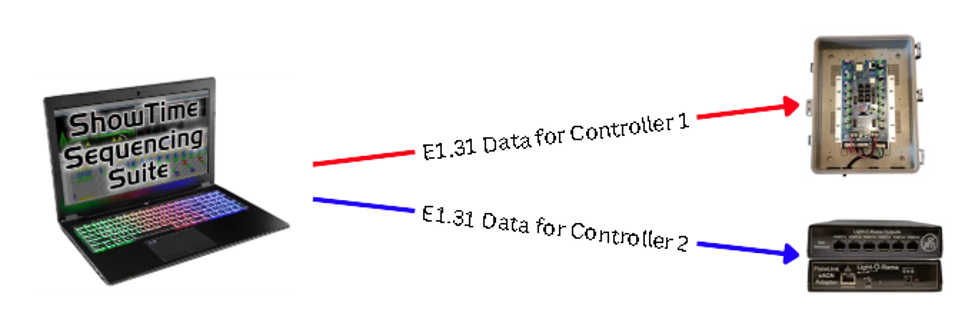
E1.31 – E1.31 (sACN) is an ethernet-based lighting control protocol that transports DMX512 lighting data over IP networks to control large numbers of lighting devices efficiently.
Network interface – This is how a device is physically connected to the network. A PC’s WiFi connection or a wired ethernet connection are two separate network interfaces. When working with synchronized lighting networks, it’s best practice to use wired connections.
IP address – Each network device requires an address to communicate across a network. Addresses within the same network will be within a range such as 192.168.1.1 through 192.168.1.254. Another example address range is 192.168.10.1 through 192.168.10.254. If two devices connected to the same network have IP addresses within different ranges, they will be UNABLE to communicate. Duplicate IP addresses are NOT permitted and will result in loss of communication for one or both devices using duplicate IP addresses. Ensure devices have unique IP addresses within the same range.
DHCP – (Dynamic Host Configuration Protocol) This is a service many routers have to automatically assign IP addresses and other network parameters to each device on the network.
Subnet mask – This defines how “big” the network is. Each set of numbers between periods defines the size of each range. Most home networks use a subnet mask of 255.255.255.0 which is good for 254 devices (1-255). Many show networks can easily use a subnet mask of 255.255.255.0 as well. This subnet mask will support up to 254 devices on the same network.
Static IP address – This is an IP address that is manually assigned. It is not dependent upon an DHCP server to automatically assign the address.
DHCP reservation – This reserves a device’s IP address so no other device on the network uses it. This can be used as an alternative to Static IP addresses. There are other terms that vary from one router brand to another. It may be called static lease, reserved IP address, MAC-to-IP binding, and client reservations, etc. Consult your router’s documentation for more detail.
DHCP lease – This is a parameter that controls how long an IP address is assigned by DHCP services. On home networks, this can range from a few hours to a few days.
DHCP address scope – This is the range(s) of IP addresses the router can assign.
Multicast vs Unicast – Multicast allows a Show PC (multicast sender) to send one stream of light data to all devices on the entire network. Controllers (multicast receivers) attached to the same network “tune” into the multicast addresses to receive data from the sender. Multicast with many DMX universes can cause network performance issues when the network is not properly designed and configured. Unicast allows a Show PC to send light data streams to specific IP addresses for specific controllers. Unicast is more network “friendly” as it uses much less bandwidth. Because unicast has less network engineering requirements, unicast is the recommended network communication type. If multicast is required for a particular setup, an isolated network is the recommended approach.
Gateway address – This address is used for network devices to reach other networks, such as the internet, outside of their range. In most cases, in your home, devices should communicate outside of your network - you may want them to be internet connected. With lighting networks, it’s common to isolate them so they are unable to communicate outside their network, but a device such as a PC may need to know the gateway to communicate out.
DNS address – This is the phonebook of networks. It converts a name such as lightorama.com to an IP address. DNS addresses for isolated networks may not be necessary. Some configurations may require a DNS address to be entered. If so, use of public DNS addresses is acceptable such as 1.1.1.1 or 8.8.8.8 etc.
Network Layout Examples
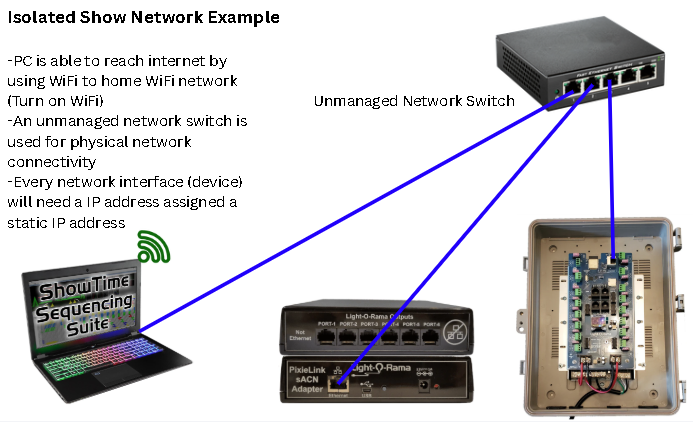
Isolated Network Example
This shows a Show PC and E1.31 devices (Aurora Core and PixieLink) connected to a switch AND the PC’s WiFi connection is turned on. The show PCs WiFi is connected to the existing Home Internet WiFi router. This will allow the Light-O-Rama mobile app to control the show. A supported Show PC and Light-O-Rama Control Panel is required. The home network and show network SHOULD NOT have the same IP address ranges. Although having the same address ranges may work, it can stop working at any time. It’s also recommended not to use a gateway address for the Show PC’s show network interface (wired connection).
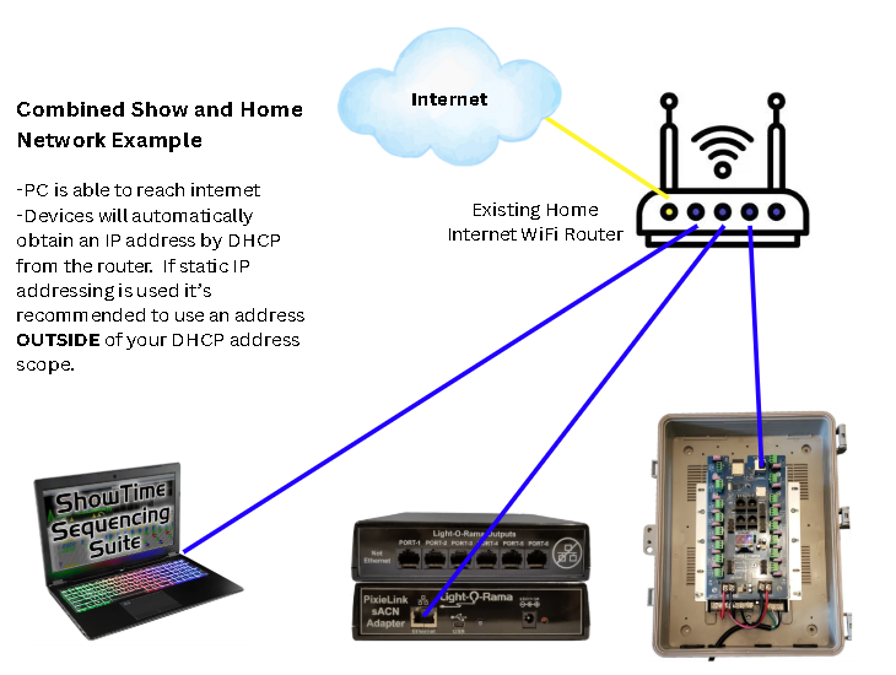
Combined Show and Home Network
A combined home & show network is possible with a more advanced setup. A Show PC and E1.31 devices (Aurora Core and PixieLink) are connected to an existing home router. The home router will manage the IP addresses of all devices when physically connected to the network. In this setup, router configuration may be required, typically adjusted in your router’s configuration / management tool. Contact your router’s documentation for more information.
Many home networks use DHCP to manage the connection / disconnection of all devices on your network. When DHCP services automatically assign IP addresses, they are not necessarily known, but can be discovered using network scanning tools or the Light-O-Rama Control Panel Controller Setup tool. Assigned addresses may also appear within your router’s configuration management interface. DHCP lease assigned IP addresses are assigned for a specific period of time: it is usually 24 hours but may be reconfigured. Many routers allow DHCP address scope adjustments — this allows static IP addresses to easily co-exist with DHCP services. It is recommended if using Static IP addresses to assign addresses OUTSIDE of the DHCP address range. Consult your router’s documentation for more information.
In general, using static IP addresses is the best workflow for lighting networks. This allows your controllers and the Show PC to have the same address — all the time.