Clicking on the "Pixel Console" button of the Light-O-Rama Hardware Utility opens the Pixel Test Console. The Pixel Test Console is best used to test RGB Light-O-Rama controllers. The labels above each group of sliders show the physical pixel number, as well as the LOR channels in use.
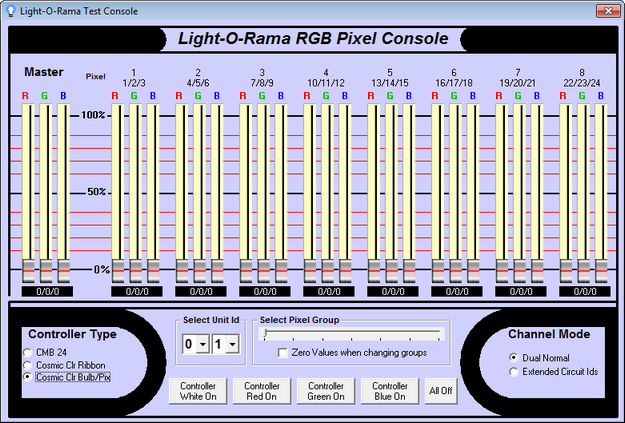
The Pixel Test Console of the Hardware Utility
Color Label
The colored label box under each group of 3 sliders shows an approximate representation of the color that will be output by the device. NOTE: colors on your monitor may not exactly match what you would see on the actual device. You should always reference what is actually output on the physical device. Clicking this box will bring up a color selection dialog that will set the R G and B components. The numbers shown in the box are the LOR intensities of each of the sliders, R/G/B.
Controller Type
Use this section (in the lower left) to choose whether to use a test a Light-O-Rama CMB24 controller, Cosmic Color Ribbon, or Cosmic Color Bulb/Pixel device.
Channel Mode
This section (in the lower right) is available only if the controller type is set to "Cosmic Color Bulb/Pixel". Set this to match the configuration of your Cosmic Color device.
Select Unit ID
Use this section to select the unit ID.
Select Pixel Group
A Light-O-Rama RGB device can support up to 300 channels as 100 pixels, however the Pixel Console can only show 8 pixels at one time. If your device supports more than 8 pixels, this selector is active and allows you to set which group of pixels to control.
Zero Values when changing groups
When using the Select Pixel Group slider, the lights for the next selected group will be updated with the values of the current sliders. However, if you check this box, the sliders will all be set to 0 when changing groups.
Set Intensities
The top portion of the Test Console shows sixteen sliders for the intensities of sixteen channels, plus a master slider (on the left) which can be used to slide them all simultaneously.
Above each slider are the Physical Pixel Number and the Light-O-Rama circuit IDs associated with that triplet.
Test Buttons
You can use the various buttons at the bottom of the Test Console to send lighting effect commands to the controller. Please remember that while the buttons may refer to 'Controller', Cosmic Color Bulbs or Pixels that are in Dual Normal mode will only update the string the Unit ID corresponds to.